Firmary Switch
Firmary Switch is a Chrome extension that reads a firm’s records out of the tools it uses today and brings them into Firmary.

What it does
Reads clients and their records from QuickBooks Online, TaxDome, Karbon, Canopy, Financial Cents or a tool it doesn’t know.
Works in your own Chrome, signed in as you, only on the sites you allow.
It only reads, and never types, saves, sends or deletes anything in the old tool.
Everything it reads goes to Move to Firmary, where you check it before anything goes live.
Who it’s for
Firms moving to Firmary that don’t want to export, clean up and upload files from their old tool.
How it works
- 1
It needs a Firmary account with Move to Firmary open. Add Firmary Switch to Chrome from the Chrome Web Store.
- 2
In Firmary, open Move to Firmary, pick your tools and pair Chrome with the code it shows.
- 3
Sign in to your old tool in Chrome. Switch reads it and hands the records to Move to Firmary for you to check.
What’s included
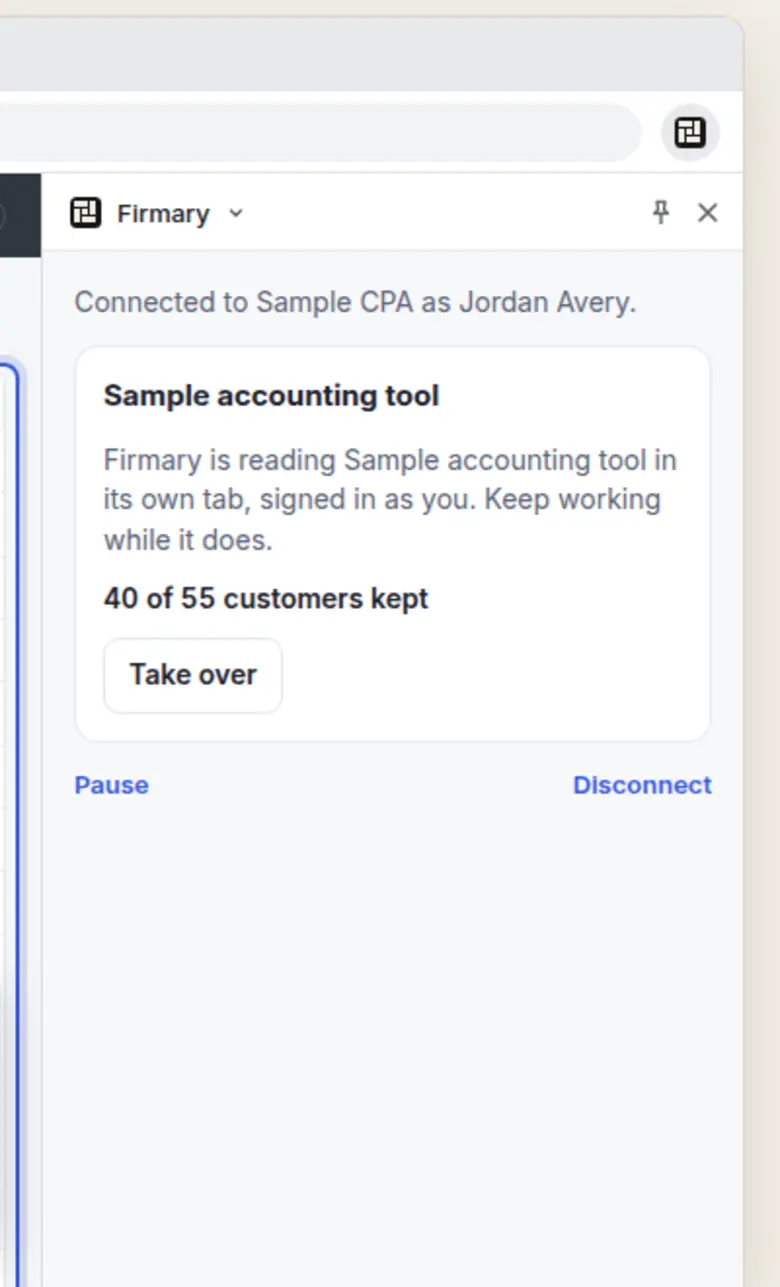
A Chrome side panel that shows its progress as it reads, such as “40 of 55 customers read”.
Pause, take over or disconnect at any time.
Documents linked from a list or a client’s page, downloaded as you, up to 25 MB a file.
Details
- Version
- 0.3.5, updated 10 November 2026
- Needs
- A Firmary account with Move to Firmary open
Limits
Not sold on its own: it comes with Firmary.
Google Chrome on a computer only.
For TaxDome, Karbon, Canopy, Financial Cents or a tool it doesn’t know, Firmary’s AI reads the pages: Anthropic’s Claude receives screenshots and page outlines, which can include visible names, amounts and notes.
Price
Comes with Firmary, from $125 a month for one person
It installs from the Chrome Web Store and works with a Firmary account. It isn’t sold on its own. Solo is $125 a month for one person, plus $85 for each person you add. Practice is $400 a month for five people, plus $80 for each person you add. Firms of 20 or more people can request a quote.
Questions
- What does Firmary Switch cost?
- Comes with Firmary, from $125 a month for one person. It installs from the Chrome Web Store and works with a Firmary account. It isn’t sold on its own. Solo is $125 a month for one person, plus $85 for each person you add. Practice is $400 a month for five people, plus $80 for each person you add. Firms of 20 or more people can request a quote.
- Does it see our passwords?
- Switch skips sign‑in pages and password fields. Screenshots it takes of your tools mask any sign‑in details it detects, but that masking is best effort.
- Which tools does it read?
- QuickBooks Online’s customer list, and the client and contact lists of TaxDome, Karbon, Canopy and Financial Cents. In any other tool, Firmary’s AI looks for supported lists and shows you the columns it found: clients, contacts, jobs, tasks, invoices, payments, time entries, documents and notes, and you check each column before it comes in.
- What if the old tool asks for a code?
- Firmary stops and hands it back to you. Answer it in the tool’s tab, and Firmary carries on.
Support
Email support@firmary.app, or start from Firmary’s help and setup page.
Goes with
- Moving in: Move to FirmaryWith FirmaryMove to Firmary brings a firm across from TaxDome, another practice tool or spreadsheets, staged as a dry run to check before anything goes live.
- FirmaryFrom $125 a month for one personFirmary is practice management software for US accounting, tax and bookkeeping firms, built for people and AI agents to work on the same client records, with PocketFirm as the client app under each firm’s brand.
- firmary, the command lineWith Firmaryfirmary is Firmary’s command line and terminal app: firm staff, their scripts and AI coding agents work in Firmary from a terminal, under the same permissions and approvals.
Checked against the running product on November 17, 2026. Questions: support@firmary.app. Everything Firmary offers